Lobby opens
There’s a short join window before every show. A viewer who sends a gift enters the game; if the streamer wants, followers and viewers who hit a set number of likes join too. If there aren’t enough viewers, the lobby waits.
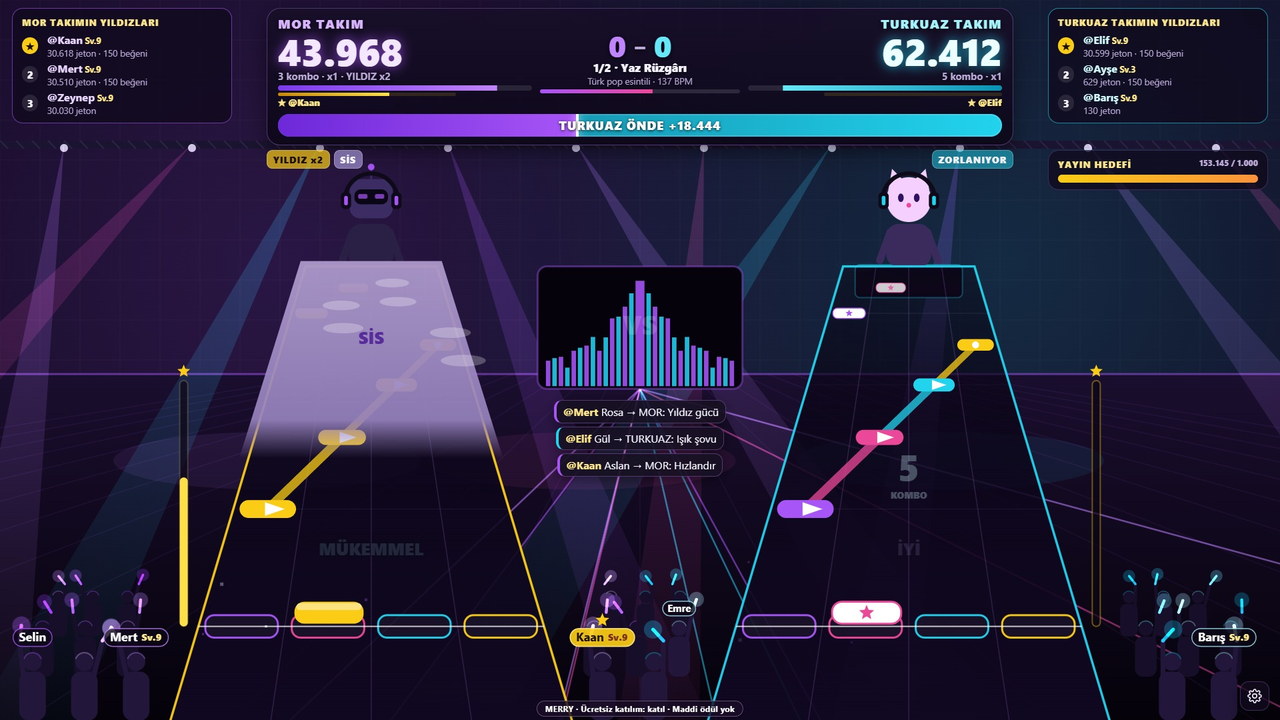
The Purple and Turquoise bands play the same song on stage. The crowd starts empty: every viewer who sends a gift joins a team with a glow stick bearing their name, and how well the bands play depends on the support they give their team. The band that wins more songs takes the show, and the viewer who gives the most support becomes the star of the stage.
You go live and put the game on screen. Rounds start and end on their own; your viewers decide what happens on screen.
There’s a short join window before every show. A viewer who sends a gift enters the game; if the streamer wants, followers and viewers who hit a set number of likes join too. If there aren’t enough viewers, the lobby waits.
Ritim Sahnesi runs the round on its own. All that’s left for you is to keep streaming and talk with your viewers.
Every incoming gift works for the sender's own team. Who sent what is shown on screen.
The lobby lasts 40 seconds, the show consists of two songs, and each song is about 1 minute 45 seconds. When the show ends, a new lobby opens automatically.
A viewer who sends a gift joins a team’s crowd with a glow stick carrying their name; each viewer gets one stick. Teams balance automatically and the screen tells the viewer which team they joined. From the panel, the streamer can also let followers join and choose how many likes earn a spot. Likes from non-participants go to no team.
Reaching the number of likes set by the streamer (e.g. 100) puts the viewer on their team. After joining, likes power your own team.
A viewer who follows you joins your team with a light stick. You can turn this option off in the panel.
A viewer who sends a gift always joins; their later gifts work only for their own team.
In the game, a viewer who joins a single light-stick spectator bearing their name . Comments have no effect on the game; the chat flows freely.
The game turns each incoming gift into an effect based on its value; the effect is always an action for the sender’s own team and never helps the rival team.
Light show and star power multiply your team’s score.
Fog is a team move your team drops on the rival band’s stage: the rival’s accuracy drops.
Bonus rain showers your team with points; speed-up is a move where your team speeds up the song, forcing the rival group to keep up with the tempo.
Once you’ve joined, your likes build your team’s momentum and, at the interval the streamer chose (e.g. every 10 likes), give your team a light show or star power. The side that sends more coins picks the next song.
No. Ritim Sahnesi runs on its own. You go live and put the game on screen; your viewers’ participation and gifts shape each round.
Sending a gift is enough; if the streamer wants, followers and viewers who hit a set number of likes join too. A viewer who joins becomes a single glow-stick spectator carrying their name, and the screen shows which team they joined.
No. Comments don’t affect the game; chat flows freely. Only likes, follows and gifts steer the game.
Open the game in MERRY Launcher or in your browser and connect with your TikTok username. Then add the game window to your scene via window capture in OBS Studio or TikTok LIVE Studio.
The images were captured from the current version of Ritim Sahnesi; viewer names and interactions were simulated in test mode. Tap an image to enlarge it.
 The show beginsThe teams are full; countdown to the first song.
 Bonus rainElif’s gift brought bonus rain to the Turquoise team.
 Face-offBoth bands on the same song; the scores neck and neck.

In a 9:16 vertical stream window Ritim Sahnesi switches its HUD to a vertical layout: scoreboard on top, the scene in the middle, the join call at the bottom. Just open a vertical canvas in OBS or TikTok LIVE Studio and capture the game window.
Pick your licence, open the game and invite your viewers. The game and your viewers handle the rest.
Guide: to see the setup step by step How to set up a TikTok LIVE game, for what gifts do in the game TikTok gift game, for more participation 10 ways to boost engagement.