TikTok LIVE stream game · Running race

Kaçış Koşusu: everyone has a runner, there’s one finish line.

The track starts empty: a runner carrying the name of each viewer who sends a gift enters the race. Runners dodge obstacles on the neon street on their own; when time runs out, the one who got furthest wins. Gifts and likes only power the sender’s own runner; nobody can throw obstacles at someone else’s runner.

  • Runs on its own
  • Join with likes, follows and gifts
  • No installation needed
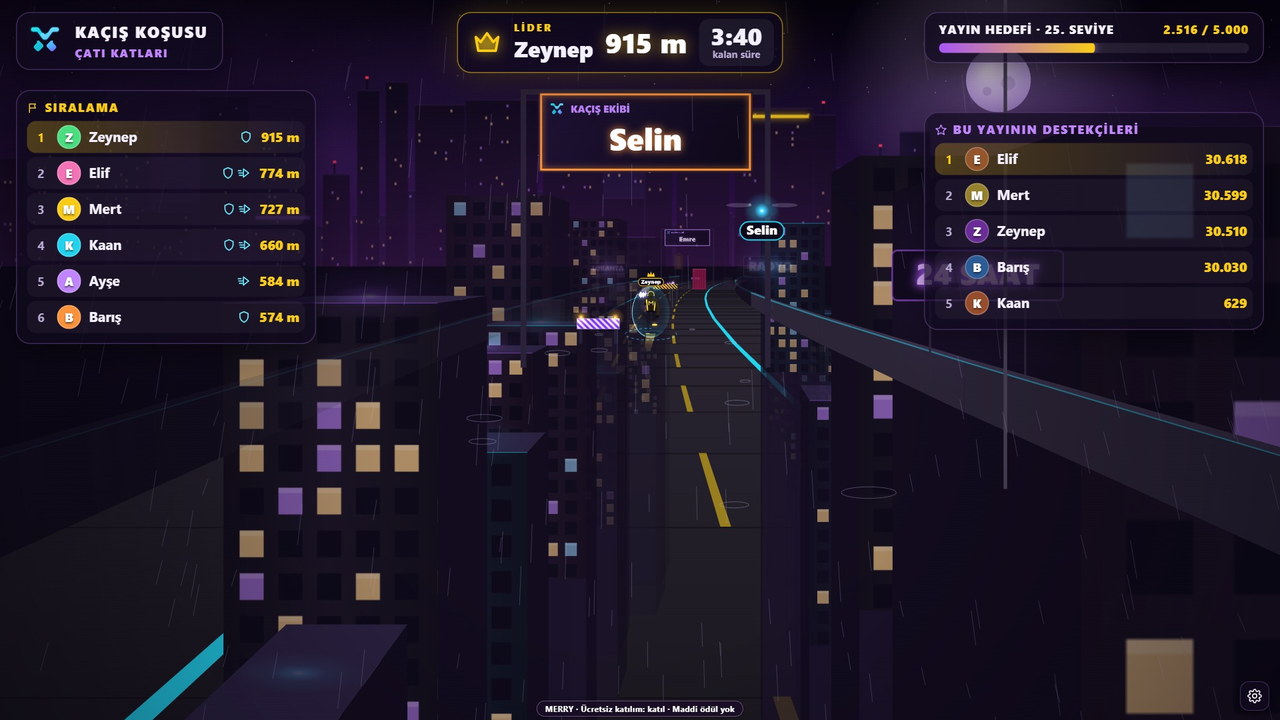
Kaçış Koşusu: the runner named Selin ahead on the neon street, live ranking on the left and leader Zeynep at 915 m
Footage was recorded inside the game; viewer interactions were simulated in test mode.
How does the game work?

The streamer doesn’t play, the game runs on its own.

You go live and put the game on screen. Rounds start and end on their own; your viewers decide what happens on screen.

Lobby opens

The track starts empty. A runner carrying the name of the viewer who sends a gift enters the race; a follow or the number of likes set by the streamer also grants a runner. One runner per viewer; the race starts once at least two runners have gathered.

The game plays itself

Kaçış Koşusu runs the round by itself. All that’s left for you is to keep streaming and talk to your viewers.

Gifts steer the game

Every incoming gift gets an instant response in the game. Who sent what is shown on screen.

The winner appears on screen

The lobby lasts 45 seconds, the race about four minutes. At the finish the standings appear on screen and a new lobby opens automatically.

How do viewers join?

Gift, follow or like: a runner bearing their name enters the race.

A runner carrying the name of a viewer who sends their first gift or follows enters the race; from the panel, the streamer sets how many likes earn a runner and whether a follow earns one. Each viewer gets one runner; anyone arriving once the track is full or after the race starts is first in line for the next round. There is no MERRY team: a race won’t start until enough viewers have gathered.

Like

A viewer who sends the number of likes set by the streamer also gets a runner in the race; during the race, likes give their own runner the effect the streamer chose (turbo, shield, rocket…).

Follow

A viewer who follows also gets a runner bearing their name in the race. The streamer can turn this off in the panel.

Gift

The first gift enters a runner carrying your name into the race; later gifts give your own runner a turbo, magnet, shield, dash and rocket.

In the game, a viewer who joins runner and their name appears on screen. Comments have no effect on the game; the chat flows freely.

What do gifts do?

Every gift changes something in the game.

The game turns each incoming gift into an effect based on its value. Small gifts make small touches; big ones change the whole round.

Small gifts

Turbo and magnet speed up your own runner and gather sparks.

Medium gifts

Shield and dash protect your own runner from collisions and launch them forward. No gift harms another runner.

Big gifts

The rocket launches your own runner; the mega pack gives shield, magnet, turbo and rocket all at once.

Likes

During the race, likes give your own runner the effect the streamer chose; likes from viewers without a runner count towards the entry threshold.

What do you need?

No installation, you're live in a few minutes.

FAQ

About Kaçış Koşusu frequently asked.

Does the streamer have to play the game?

No. Kaçış Koşusu runs on its own. You go live and put the game on screen; your viewers’ participation and gifts shape each round.

How do viewers join the game?

Sending a gift, following or sending the number of likes set by the streamer is enough. A runner carrying the viewer’s name enters the race; one runner per viewer.

Do comments affect the game?

No. Comments don’t affect the game; chat flows freely. Only likes, follows and gifts steer the game.

How do I add the game to my stream?

Open the game in MERRY Launcher or in your browser and connect with your TikTok username. Then add the game window to your scene via window capture in OBS Studio or TikTok LIVE Studio.

From inside the game

Screenshots: this is how the game looks on stream.

The images were captured from the current version of Kaçış Koşusu; viewer names and interactions were simulated in test mode. Tap an image to enlarge it.

Kaçış Koşusu vertical stream view: runners on the neon street and the ranking on top

The same game in a vertical stream

In a 9:16 vertical stream window Kaçış Koşusu switches its HUD to a vertical layout: scoreboard on top, the scene in the middle, the join call at the bottom. Just open a vertical canvas in OBS or TikTok LIVE Studio and capture the game window.

Other live stream games

Fits your stream pick another game too.

Put Kaçış Koşusu on stage in your next stream.

Pick your licence, open the game and invite your viewers. The game and your viewers handle the rest.